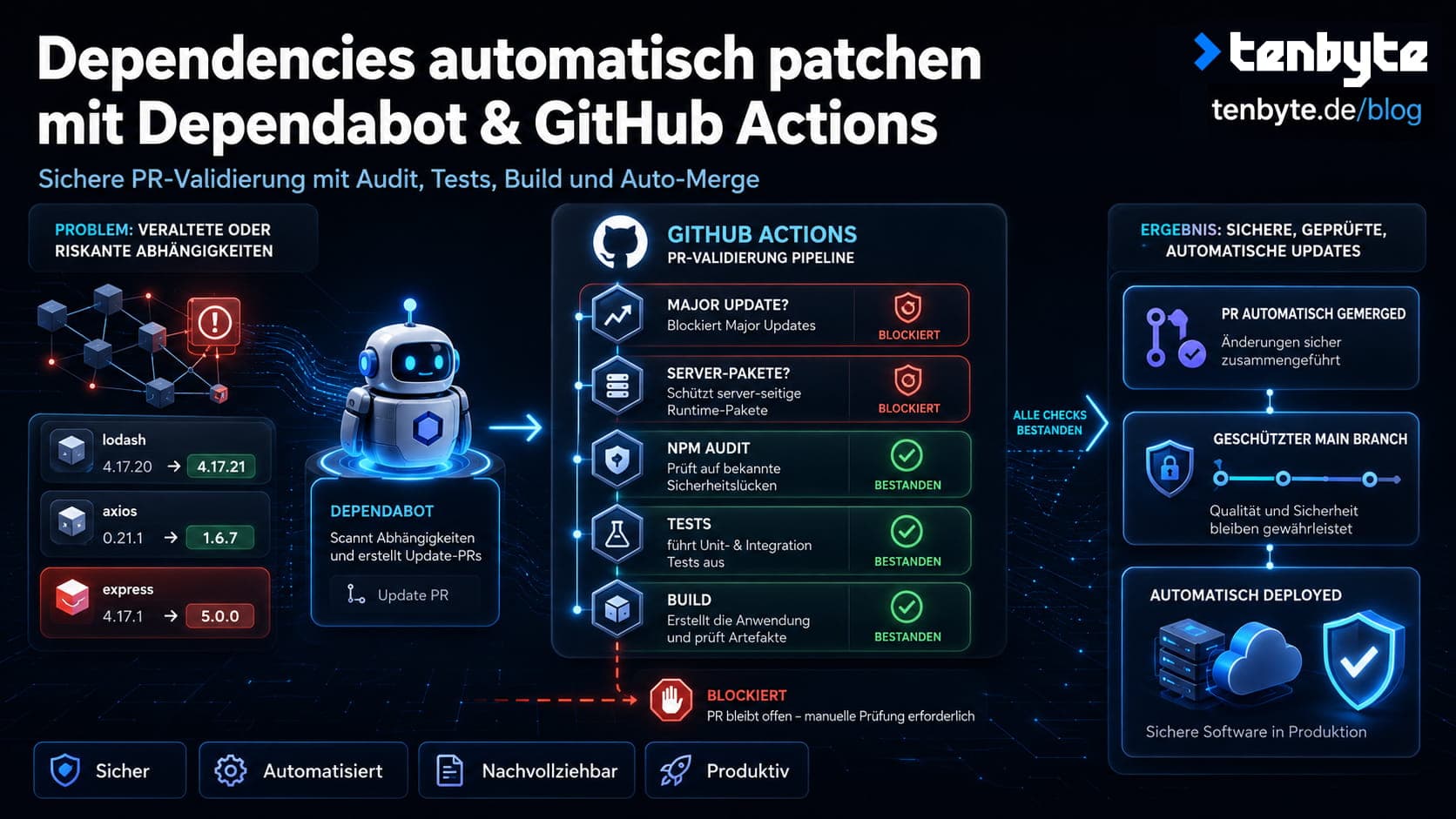
This is the second article in our series on automating Next.js deployments on Plesk. The previous post covered the CI/CD pipeline that deploys your application automatically on every push to main. This article builds on that foundation: once your pipeline is in place, you also want your dependencies kept up to date — automatically, safely, and without manually reviewing every minor version bump.
The system described here uses two components: a dependabot.yml configuration that tells GitHub which packages to watch and when, and a GitHub Actions workflow that validates every Dependabot pull request before merging it.
Why automated dependency updates matter
Outdated dependencies are one of the most common attack vectors in modern web applications. Known vulnerabilities in npm packages (tracked as CVEs) are publicly listed — which means attackers can specifically target projects running affected versions. Staying current is not just a hygiene issue, it is a security requirement.
At the same time, blindly auto-merging every update is not safe either. A dependency update could introduce a breaking change, a security regression, or — in the case of a compromised package — malicious code. This is called a supply chain attack: instead of attacking your application directly, an attacker compromises a package your project depends on.
The workflow described here handles both concerns: it keeps dependencies current while making sure every update passes a defined set of checks before it is merged.
How it works
Dependabot scans your package.json on a schedule and opens pull requests for outdated packages. The auto-merge workflow then runs automatically on every Dependabot PR and works through a series of checks:
- Is this a major version update? If yes, block auto-merge and require manual review.
- Is this a server-side runtime dependency? If yes, block auto-merge and require manual review.
- Does
npm auditreport any high or critical vulnerabilities? If yes, block. - Do all tests pass? If no, block.
- Does the build succeed? If no, block.
- Only if all of the above pass: merge automatically.
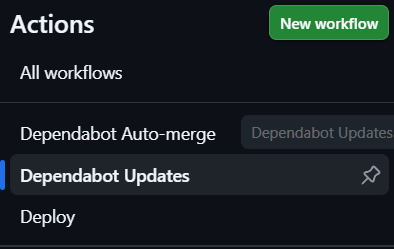
Here is what both workflows look like in the GitHub Actions sidebar — Dependabot Auto-merge handles the validation logic, while Dependabot Updates is GitHub’s built-in view of what Dependabot is currently doing:
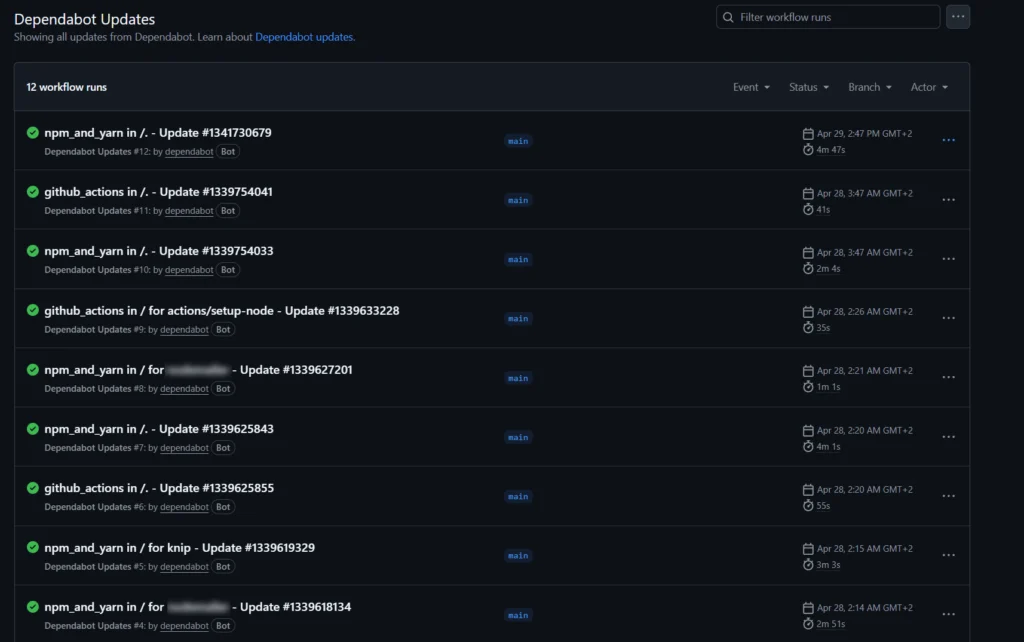
Here is an overview of the Dependabot Updates workflow runs — all green, meaning every update passed the checks and was merged automatically:
Part 1: dependabot.yml
Create the file .github/dependabot.yml in your repository. This tells Dependabot what to watch, when to check, and how to group related updates.
version: 2
updates:
  - package-ecosystem: npm
    directory: /
    schedule:
      interval: weekly
      day: wednesday
    ignore:
      - dependency-name: '*'
        update-types: ['version-update:semver-major']
    groups:
      react:
        patterns:
          - 'react'
          - 'react-dom'
          - '@types/react'
          - '@types/react-dom'
      # Add more groups as needed for your project

  - package-ecosystem: github-actions
    directory: /
    schedule:
      interval: weekly
      day: monday
A few decisions worth explaining:
Weekly schedule on Wednesday gives you a predictable cadence. Updates arrive on the same day each week rather than randomly throughout the week. GitHub Actions packages are checked on Monday separately — this way action updates get reviewed early in the week before the npm updates arrive.
Major versions are ignored entirely (update-types: ['version-update:semver-major']). Major updates often contain breaking changes that require manual migration work. Auto-merging them would be dangerous. Instead, they need to be reviewed and handled deliberately. Dependabot will still open PRs for them, but the auto-merge workflow will block them.
Grouping related packages reduces noise. Without groups, updating a React-related stack might generate five separate PRs — one for react, one for react-dom, one for @types/react, and so on. With groups, they arrive as a single PR that is reviewed and merged together. This also avoids situations where react and @types/react are on different versions temporarily.
GitHub Actions packages are also tracked. This ensures the action hashes referenced in your workflows (see our note on pinning commit hashes) are kept up to date automatically.
Part 2: The auto-merge workflow
Create the file .github/workflows/dependabot-auto-merge.yml:
name: Dependabot Auto-merge

on:
  pull_request:

env:
  FORCE_JAVASCRIPT_ACTIONS_TO_NODE24: true

jobs:
  auto-merge:
    runs-on: ubuntu-latest
    if: github.actor == 'dependabot[bot]'

    permissions:
      contents: write
      pull-requests: write

    steps:
      - uses: actions/checkout@de0fac2e4500dabe0009e67214ff5f5447ce83dd # v6.0.2
        with:
          ref: ${{ github.head_ref }}

      - uses: dependabot/fetch-metadata@25dd0e34f4fe68f24cc83900b1fe3fe149efef98 # v3.1.0
        id: meta

      - name: Check update type
        id: check
        run: |
          if [ "${{ steps.meta.outputs.update-type }}" = "version-update:semver-major" ]; then
            echo "is_major=true" >> $GITHUB_OUTPUT
            echo "Major update detected — skipping auto-merge"
          else
            echo "is_major=false" >> $GITHUB_OUTPUT
          fi

      - name: Block server-side runtime packages
        id: block
        if: steps.check.outputs.is_major == 'false'
        run: |
          PKGS="${{ steps.meta.outputs.dependency-names }}"
          for pkg in package-a package-b package-c; do
            if echo "$PKGS" | grep -qw "$pkg"; then
              echo "::error::$pkg is a server-side runtime dependency — auto-merge blocked, manual review required"
              exit 1
            fi
          done

      - uses: actions/setup-node@48b55a011bda9f5d6aeb4c2d9c7362e8dae4041e # v6.4.0
        if: steps.check.outputs.is_major == 'false' && steps.block.outcome == 'success'
        with:
          node-version: '22'
          cache: 'npm'

      - name: Install dependencies
        if: steps.check.outputs.is_major == 'false' && steps.block.outcome == 'success'
        run: npm ci

      - name: Audit dependencies
        if: steps.check.outputs.is_major == 'false' && steps.block.outcome == 'success'
        run: npm audit --audit-level=high

      - name: Run tests
        if: steps.check.outputs.is_major == 'false' && steps.block.outcome == 'success'
        run: npm test

      - name: Build
        if: steps.check.outputs.is_major == 'false' && steps.block.outcome == 'success'
        run: npm run build
        env:
          NEXT_PUBLIC_APP_URL: ${{ secrets.NEXT_PUBLIC_APP_URL }}

      - name: Auto-merge
        if: steps.check.outputs.is_major == 'false' && steps.block.outcome == 'success'
        run: gh pr merge --auto --squash "${{ github.event.pull_request.number }}"
        env:
          GH_TOKEN: ${{ secrets.GITHUB_TOKEN }}
What each step does — and why
if: github.actor == 'dependabot[bot]'
The entire job only runs if the pull request was opened by Dependabot. This prevents the auto-merge logic from accidentally triggering on regular PRs.
dependabot/fetch-metadata
This action reads metadata from the Dependabot PR — the package name, the previous version, the new version, and the update type (patch, minor, or major). This information drives all subsequent decisions.
Note that this action is also pinned to a commit hash, for the same reason as actions/checkout — see our explanation on commit hash pinning.
Check update type
Reads the update-type output from the metadata step. If it is version-update:semver-major, the workflow sets a flag and all subsequent steps are skipped. The PR stays open for manual review.
Block server-side runtime packages
Even for minor and patch updates, some packages deserve manual review because they run directly on the server and handle sensitive operations — things like database connections, caching, or email delivery. The workflow loops through a defined list of such packages and blocks auto-merge if any of them appear in the PR.
This matters because a compromised or broken patch update to a server-side package can have consequences that are harder to detect than a broken frontend dependency. A broken UI component is visible immediately. A broken caching layer or a subtle data integrity issue might not surface for hours.
npm audit --audit-level=high
Runs a security audit on the updated dependency tree. If the new package version itself introduces a known high or critical vulnerability — or if it pulls in a transitive dependency that does — the workflow blocks the merge. This is a meaningful check because sometimes a package update resolves one CVE but introduces another.
npm test
This is where your test suite earns its value. The tests run against the updated dependencies before anything gets merged. What you test here matters: input sanitization checks, rate limiting behavior, protection against race conditions, and any other logic that could be affected by a dependency change. A dependency update that causes a test failure blocks the merge automatically.
npm run build
Confirms the application still builds successfully with the updated dependencies. A package that passes all tests but breaks the build will still be caught here.
Auto-merge with squash
If every check passes, the PR is merged automatically using a squash commit. This keeps the git history clean — instead of a separate commit for every Dependabot PR, each merged update appears as a single commit on main. Once merged, the deploy pipeline from the previous post picks it up and deploys automatically.
A note on supply chain security
One detail in this workflow is worth highlighting explicitly: dependabot/fetch-metadata is pinned to a commit hash just like the other actions. This is deliberate.
A supply chain attack on a GitHub Action works like this: an attacker gains access to an action repository and moves a tag (like @v2) to point at malicious code. Any workflow using @v2 would then silently execute the attacker’s code with whatever permissions the workflow has. By pinning to a commit hash, you are immune to this — the hash cannot be moved.
Dependabot itself helps with this: with package-ecosystem: github-actions configured, Dependabot will open PRs to update your pinned action hashes when new versions are released. You get the security of hash pinning without having to manually track new action versions.
The result: what it looks like in practice
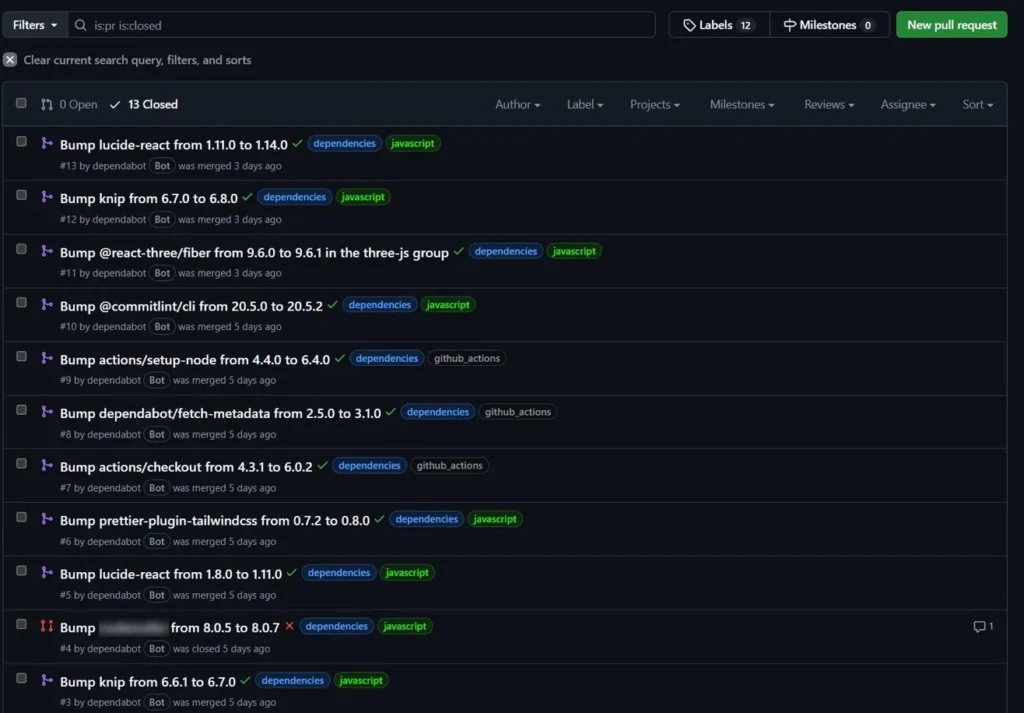
Here is a real pull request list from a project using this setup. Green checkmarks mean the PR passed all checks and was merged automatically. The red X on one entry shows a PR that was blocked — the workflow detected a server-side runtime dependency and stopped before running any tests:
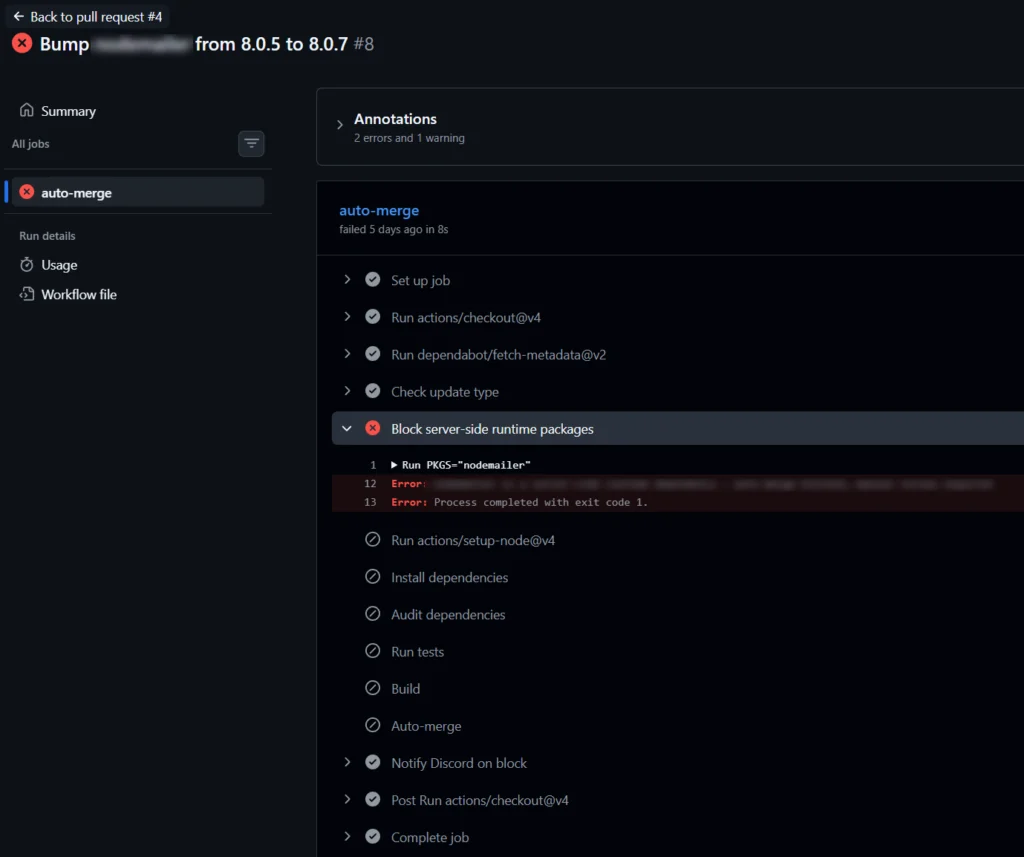
Here is what the blocked run looks like in detail. The workflow stopped at „Block server-side runtime packages“ after 8 seconds — without installing dependencies, running tests, or building anything. All subsequent steps were skipped automatically:
Minor and patch updates that pass all checks merge without any manual intervention. Major updates and flagged packages stay open as pull requests, ready for manual review when there is time to look at them properly.
Quick checklist
.github/dependabot.ymlcreated with npm and github-actions ecosystems configured- Groups defined for packages that belong together
- Major versions excluded from Dependabot auto-updates
.github/workflows/dependabot-auto-merge.ymlcreated- Server-side runtime packages listed in the block step
- Test suite covers critical application behavior (sanitization, rate limiting, race conditions)
NEXT_PUBLIC_APP_URLand other build-time secrets available in the repository- Auto-merge permissions enabled for the repository (Settings → General → Allow auto-merge)
Troubleshooting
Workflow does not trigger on Dependabot PRs
Check that the workflow file is on the main branch and that the trigger is on: pull_request without branch restrictions.
Auto-merge step fails with a permissions error
Make sure auto-merge is enabled in the repository settings under Settings → General → Allow auto-merge. Also verify the permissions block in the workflow includes both contents: write and pull-requests: write.
A package I want to auto-merge is being blocked
Check whether it appears in the server-side runtime package block list in the workflow. If it was added there intentionally, remove it from the list to allow auto-merge. If it is a major version update, it will always require manual review by design.
Dependabot is not opening PRs
Verify the .github/dependabot.yml file exists on the default branch and is valid YAML. GitHub has a Dependabot configuration validator in the repository Insights tab under Dependency graph → Dependabot.
⚠️ Please note: We do our best to keep things accurate, but we can’t guarantee perfection. Use at your own risk. If you encounter errors, feel free to open an issue via GitHub.
If this works for you we would love to see your support on Instagram, LinkedIn or GitHub ❤️